Overview
Designers and developers reach for the same handful of utilities all day long — sample a colour off a page, identify a font, check a contrast ratio, lift the CSS from an element. The problem isn't that these tools don't exist; it's that they're scattered across a dozen one-trick extensions, web apps, and dev-tools panels, each with its own UI and its own tab.
Designer Toolkit pulls the essentials into a single browser extension: one clean, fast popup with everything a tab away. A colour picker, a font inspector, a WCAG contrast checker, a colour-blindness simulator, and a style grabber — built to feel like one product rather than five bolted together.
Colour picker
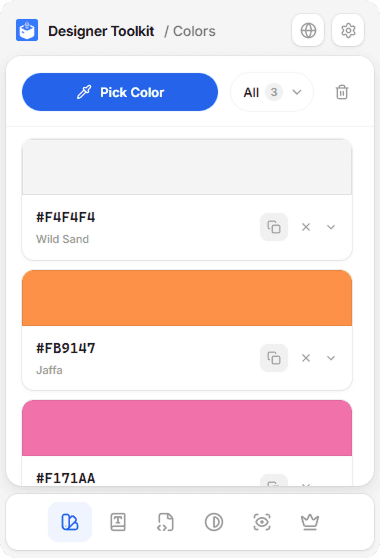
The colour tab is the heart of the toolkit. Hit Pick Color, the native eyedropper takes over, and whatever you sample lands in a list — each swatch labelled with its hex value and its human colour name (#FB9147 → "Jaffa"), so a palette reads like words, not just codes.
Saved colours can be sorted into groups, so a project's palette stays separate from a quick one-off sample. The count in the header keeps the list honest at a glance.
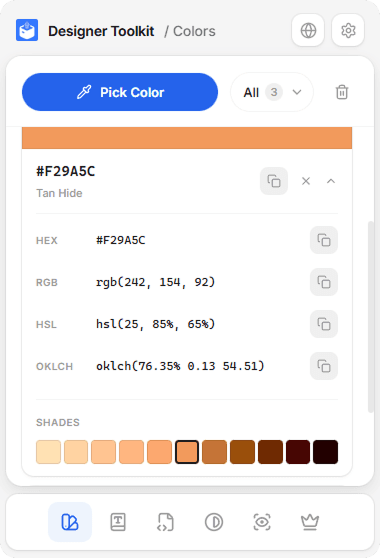
Expand any colour and it unfolds into every format worth having — HEX, RGB, HSL, and OKLCH — each with its own copy button, plus an automatically generated shade ramp from light to dark. No mental maths, no second tool to convert formats.
Font picker
Identifying type on a live page is usually a dev-tools archaeology dig. The font tab makes it a click: Pick Font, point at any text, and the toolkit reads back exactly what's rendering.
The hard part was showing the font rather than just naming it. A name alone (Inter) tells you almost nothing — so each saved font renders a live AaBbCcDdEeFf specimen in the font itself, captured from the page so the preview is true to what the user is actually seeing.
Expanded, it lays out the whole spec the way a designer thinks about type — family, size, weight, style, leading, tracking, and colour — each value one tap from the clipboard.
Accessibility, built in
Accessibility shouldn't be a separate tool you remember to open. Two tabs make WCAG part of the same workflow as picking colour.
Contrast checker
Drop in a foreground and a background — or swap them with one button — and the toolkit computes the contrast ratio and grades it against WCAG AA and AAA for both normal and large text. Each threshold passes or fails on the spot, so "is this readable?" becomes a yes/no instead of a guess.
Colour-blindness simulator
The simulate tab applies a colour-vision deficiency filter to the live site itself, so you see the real page the way a user with that condition would — not a swatch, the actual layout. It covers the full range, from the common red–green deficiencies (protanopia, deuteranopia) through blue–yellow to full achromatopsia, each annotated with roughly how many people it affects.
Style grabber, and the glue
Sometimes you don't want a colour or a font — you want the whole thing. Grab Styles lets you point at any element and lifts its computed CSS into a copyable block: background-color, border, font-family, line-height, the lot. It's the fastest path from "I like how that looks" to a snippet you can paste.
Five utilities only feel like one product if they share habits, and settings is where that consistency lives: a light/dark theme, a default colour format so HEX-people and OKLCH-people each get their preferred output everywhere, auto-copy on pick for the one-handed flow, and a cap on how much history to keep.
The result is a toolkit that opens fast, stays out of the way, and replaces a cluttered row of single-purpose extensions with one you actually keep pinned.